
Citizen: Protect The World
Sp0n Inc.News & Magazines
4.531.84K Reviews
- Version
- 0.1318.0
- Installs
- 5.00M
- Age Rating
- Teen
Screenshots
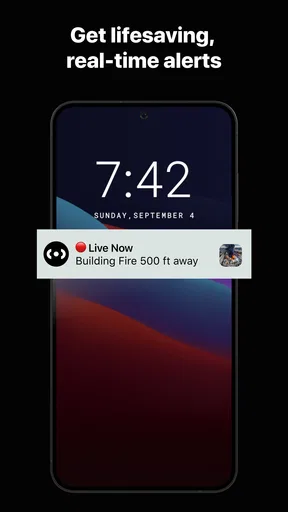
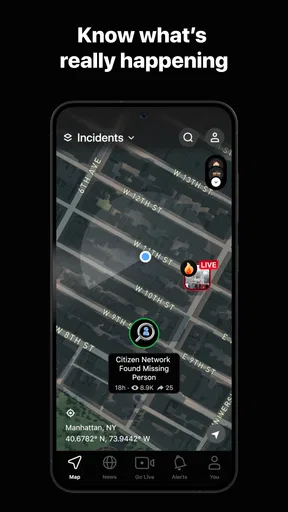
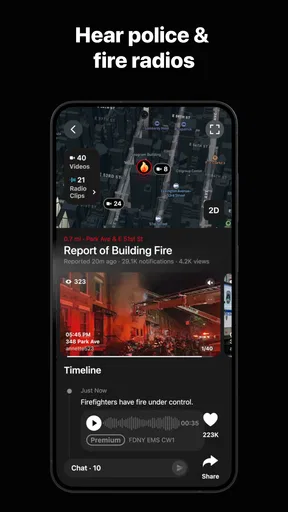
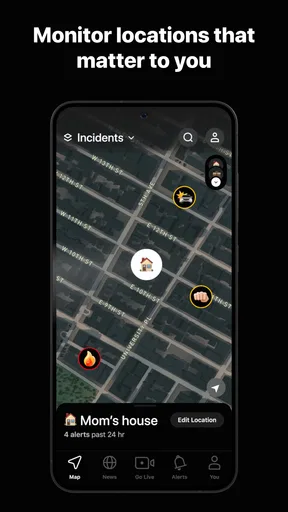
Our Review of Citizen: Protect The World
 Analysis by Appyee
I’d approach Citizen: Protect The World as a neighborhood-awareness tool, not as a replacement for emergency services or a guarantee that every alert is complete. Its value is helping me notice reported incidents nearby and make more informed choices about where I’m going. That distinction matters: the app can add useful context, but I would still rely on official instructions and call emergency services when a situation requires immediate help.
Who gets the most out of it
I can see it being useful if you regularly travel through unfamiliar parts of town, walk home at different hours, or want a quick sense of what is happening near a family member’s usual route. It may also help someone who has just moved and is still learning the area. The map and local updates give those users a way to check the surroundings without depending only on word of mouth or scattered social posts.
It is a less natural fit if you dislike location-aware alerts, prefer a quiet phone, or expect a polished official account of every incident. Citizen is built around fast community awareness, so reports may be brief and developing situations can change. If your main need is planned public-safety guidance, an official local agency channel may be a better primary source; I’d treat Citizen as a complement rather than the final authority.
A practical first-day routine
When opening the app for the first time, I’d take a moment to make the location and notification choices deliberately instead of accepting every prompt on autopilot. Choose settings that match how you actually move around: a commuter may want useful nearby notices during travel, while someone who mainly checks in at home may prefer fewer interruptions. If a notification option feels too broad, I’d adjust it before deciding the whole app is noisy.
My first useful action would be simple: open the map before leaving, look at the recent reports around the route, and decide whether I want to take another street or allow extra time. That is a modest use, but it gives the app a clear job. I would not keep refreshing it while walking; checking before setting out is easier and safer than staring at a screen in motion.
How to read reports without overreacting
A nearby alert is a prompt to pay attention, not proof that danger is at your exact location. I’d check where the marker sits, read the report for its context, and consider whether it actually intersects with my plans. A report on the map can concern a location several streets away, and the label alone may not tell the whole story. Keeping that distance in mind prevents a dramatic notification from turning into an unnecessary detour.
Community reporting is useful because people may notice events before a fuller update appears, but speed has a trade-off: early accounts can be incomplete or mistaken. I’d avoid repeating an unconfirmed report as fact, and I would not approach an incident to gather details. If I witness something, I’d prioritize my own safety and use the app only when doing so is appropriate; urgent calls belong with emergency services.
What to expect from alerts and audio
Alerts are most helpful when they are selective. In a busy neighborhood, a broad stream of notifications can become background noise, making it easier to miss something relevant. I’d use the available notification controls to find a balance, then revisit them if my routine changes. Someone who commutes across several neighborhoods may need a different setup from someone who mostly stays close to home.
The live audio option can add context, but I would not treat it as a complete or easy-to-follow explanation of an event. Radio communications can be technical, partial, or hard to understand without local knowledge, and listening is not the same as receiving an official public update. I’d use it out of interest rather than as a substitute for clear instructions, and I’d turn it off when it distracts from what I’m doing.
How it compares with familiar alternatives
Compared with a general news app, Citizen is more focused on nearby incidents than on national headlines or broader reporting. Compared with neighborhood social networks, its incident map and immediate-alert approach make it easier to scan what has been reported in the area, while social posts may offer more conversation or local recommendations. Neither format is a perfect source of truth, and I would not use either one alone to make a high-stakes safety decision.
It also differs from checking a local government or emergency-services page. Those channels can be the better place for formal instructions and confirmed notices, while Citizen can be handy for a quicker, community-level view. My practical approach would be to use the app to notice a developing issue, then look for official guidance when I need to know what action to take.
The trade-off behind a real-time safety feed
Citizen is a free news and safety app from Sp0n Inc. It has a 4.5 average from around 102,000 ratings, and more than 5 million installs. The Teen age rating is worth noting for families deciding whether it suits younger users: reports about emergencies and crime may be unsettling, so I’d consider a child’s maturity and discuss what the alerts mean rather than assuming the feed is suitable for everyone.
The app’s current version is 0.1278.1, and it requires Android 9 or later on Android devices. It is free to download, with in-app purchases listed from $4.99 to $399.99 per item. I’d check the purchase details in the app before paying for anything and would not assume that a paid option is necessary for the basic purpose of checking local reports. Its release date, January 16, 2017, also places it among established apps rather than a brand-new experiment.
One practical trade-off is attention. A safety feed can make people feel more informed, but constantly watching reports may increase anxiety without improving anyone’s decisions. I’d set a specific purpose—such as checking a route or understanding a nearby disruption—and then close the app. If alerts regularly interrupt work or sleep, reducing them is more sensible than leaving them enabled out of fear of missing everything.
Another is coverage and interpretation. What appears in a community incident feed may vary by place and by what people report, so a quiet map should not be read as proof that nothing is happening. Likewise, a cluster of reports does not automatically mean every nearby street is unsafe. The most useful habit is to combine the app’s local perspective with ordinary judgment and official information when the stakes are high.
What is Citizen: Protect The World?
Citizen: Protect The World is a real-time safety app that provides updates on emergencies and incidents happening nearby. It's like a digital neighborhood watch, but way cooler. With its user-friendly interface, you can quickly find out what's going on around you, whether it’s a fire, a traffic jam, or something more serious.
How Does It Work?
This app taps into your phone's GPS to keep track of your location and sends alerts about incidents happening near you. It sources information from various emergency services and user reports, giving you a comprehensive view of what's happening. You also have the option to report incidents yourself, making it a collaborative effort to keep everyone informed.
One of the coolest features? You can listen to live audio of police and fire department communications. Talk about feeling like a detective!
Getting Started
Setting up Citizen: Protect The World is a breeze. Just download the app from the Google Play Store or Apple’s App Store, and you’re good to go. After a quick sign-up process, you’ll start receiving notifications tailored to your location. You can customize the types of alerts you want to receive, ensuring you’re not bombarded with information you don’t need.
Features That Stand Out
- Real-Time Alerts: Stay informed about incidents as they happen. The app ensures you’re always in the loop about anything that might affect your safety.
- Community Reporting: Be a part of the solution by reporting incidents you witness. Your input helps keep the information flow accurate and up-to-date.
- Live Audio Feeds: Listen to real-time police and fire department communications. It’s a thrilling way to stay connected and understand the seriousness of situations.
- Safety Map: Visualize incidents on a map, so you know exactly where things are happening in relation to your current location.
Why You’ll Love It
If you’re someone who loves staying informed and wants to be proactive about safety, this app is a game-changer. The ability to receive instant updates about incidents makes you feel more in control and secure. Plus, the community aspect of the app fosters a sense of togetherness as everyone works to keep each other safe.
And let’s be honest, there’s a bit of a thrill in being the first to know what’s happening, right?
Potential Drawbacks
While the app is fantastic, it’s not without its quirks. The constant notifications can be overwhelming, especially if you’re in a busy area. However, you can tweak the settings to reduce the number of alerts. Additionally, the app relies heavily on user reports, which can sometimes lead to inaccuracies. But hey, no app is perfect, right?
Final Thoughts
Overall, Citizen: Protect The World is an incredible tool for anyone who values safety and community involvement. It’s easy to use, packed with features, and genuinely makes you feel more connected to your surroundings. Whether you’re a safety enthusiast or just curious about your neighborhood activities, this app is a worthy addition to your smartphone.
So, are you ready to join the community of informed and engaged citizens? Download the app today and start making a difference!
Privacy and Permissions
See what permissions an app requests and how it handles your data.
- Contacts
- read your contacts
- Location
- approximate location (network-based), precise location (GPS and network-based)
- Phone
- read phone status and identity
- Photos/Media/Files
- read the contents of your USB storage, modify or delete the contents of your USB storage
- Storage
- read the contents of your USB storage, modify or delete the contents of your USB storage
- Camera
- take pictures and videos
- Microphone
- record audio
- Wi-Fi connection information
- view Wi-Fi connections
- Device ID & call information
- read phone status and identity
- Other
- view network connections, pair with Bluetooth devices, access Bluetooth settings, control flashlight, full network access, change your audio settings, run at startup, reorder running apps, control vibration, prevent device from sleeping
Verdict
Strengths of Citizen: Protect The World
- Real-time location-based alerts.
- Community-sourced safety updates.
- User-friendly interface.
- Seamless integration with local services.
- Customizable alert settings.
Limitations of Citizen: Protect The World
- Battery drain due to location tracking.
- Potential privacy concerns.
- Limited functionality in rural areas.
- Notifications can be overwhelming.
- Requires constant internet access.
Similar Picks in This Category
View All
Google News - Daily Headlines
Google LLC4.0

X
X Corp.4.8

Flipboard:Your Social Magazine
Flipboard3.4

Opera News: breaking & local
Opera4.5

Hindi News by Dainik Bhaskar
Dainik Bhaskar Group4.0

Way2News Daily News App
Way2News ( Formerly Way2SMS )4.6
Frequently Asked Questions
What is Citizen: Protect The World and how does it work?
Citizen: Protect The World is a safety-focused app designed to keep users informed about nearby incidents and emergencies. It uses real-time data and user reports to alert you to potential dangers, allowing you to stay safe and informed. Users can also report incidents directly through the app to help others stay aware.
Is Citizen: Protect The World available for both Android and iOS devices?
Yes, Citizen: Protect The World is available for download on both Android and iOS platforms. You can find it on the Google Play Store for Android devices and the Apple App Store for iOS devices, ensuring a wide reach for users seeking safety and awareness features.
Does using Citizen: Protect The World require a subscription or is it free?
Citizen: Protect The World is free to download and use. However, some advanced features may require a subscription. The basic functionalities, such as receiving alerts and reporting incidents, are generally available without any cost, making it accessible for anyone looking to enhance their personal safety.
How accurate and reliable is the information provided by Citizen: Protect The World?
The app strives for high accuracy by aggregating data from trusted sources, including 911 alerts and user reports. While it aims to provide reliable information, users should verify critical alerts through official channels when possible. Community engagement helps improve the app's overall accuracy and responsiveness.
What privacy measures does Citizen: Protect The World implement to protect user data?
Citizen: Protect The World is committed to safeguarding user privacy by implementing robust data protection measures. It collects minimal personal information and employs encryption to protect data transmissions. Users can control what data they share, ensuring transparency and security in their interactions with the app.
